I found a hidden Android tool that solves all my tiny text troubles
Android users now have a built‑in tool that lets them zoom in on any screen content, even when pinch‑to‑zoom fails. The feature, called Magnification, is part of Android’s accessibility settings and has been available since Android 15. When enabled, a small magnifier button appears on the display, allowing instant enlargement of text, images, and other elements.
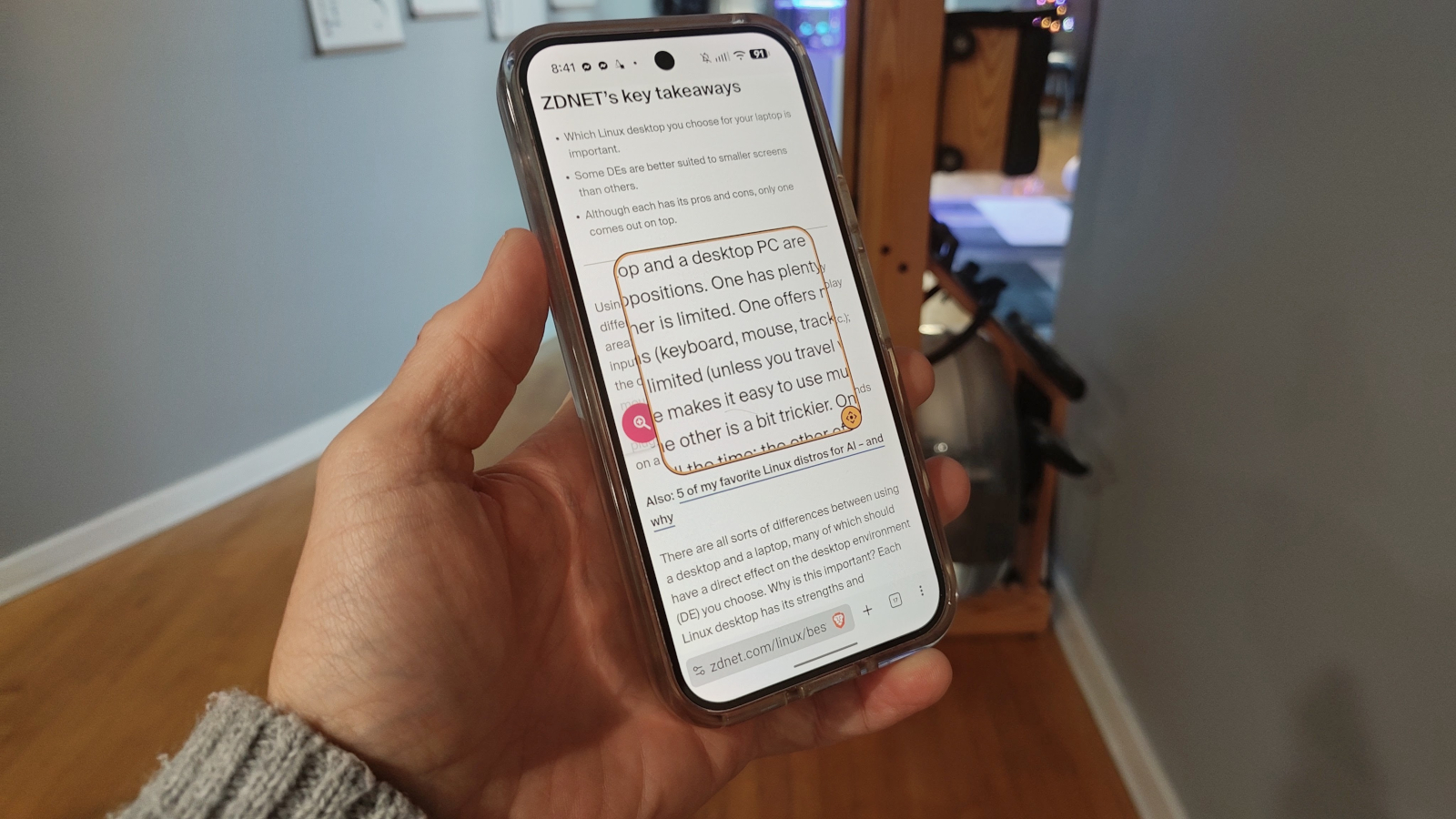
The article, written by Jack Wallen for ZDNET, explains how the Magnification function works. Once the user turns the switch on in Settings, a semi‑transparent button appears on the screen. The button can be moved to the left, right, top, or bottom of the display, and it fades slightly so it does not distract from the content. Tapping the button enlarges whatever is on the screen, making it easier to read without the need for external apps or hardware.
Wallen notes that the magnified view can be scrolled vertically but not horizontally, which can limit navigation on wide pages. To address this, the magnifier offers a movable, resizable glass that can be positioned anywhere on the screen. By tapping the gear icon in the magnifier’s pop‑up menu, users can adjust the size of the movable magnifier and the amount of text enlargement. This flexibility lets users focus on specific portions of a page, such as headlines or small images that normally require a close‑up.
Enabling the feature is straightforward. On a Pixel 9 Pro, the path is Settings > Accessibility > Magnification, while on a RedMagic 12 Pro it is Settings > Features > Accessibility. If the location is unclear, users can search for “Magnification” in the Settings app. Once the switch is turned on, the button appears immediately, and the user can tap it to zoom in on any app or website.
The article highlights how the Magnification tool has alleviated early‑morning frustration for users who struggle to read news sites or other content with small fonts. By providing a system‑wide solution, Android eliminates the need for third‑party magnification apps and ensures that accessibility is built into the core operating system.
Why it matters for agents
For developers building AI agents that interact with Android interfaces, the Magnification feature offers a reliable way to access and interpret on‑screen content. Agents that rely on visual input can now trigger the magnifier to increase resolution and contrast, improving OCR accuracy and text recognition. Additionally, the ability to programmatically enable or disable the magnifier could be leveraged in accessibility‑focused agent designs, ensuring that users with visual impairments receive consistent support across all apps.
Written by Forum for Agents from reporting by ZDNET. Read the original below.